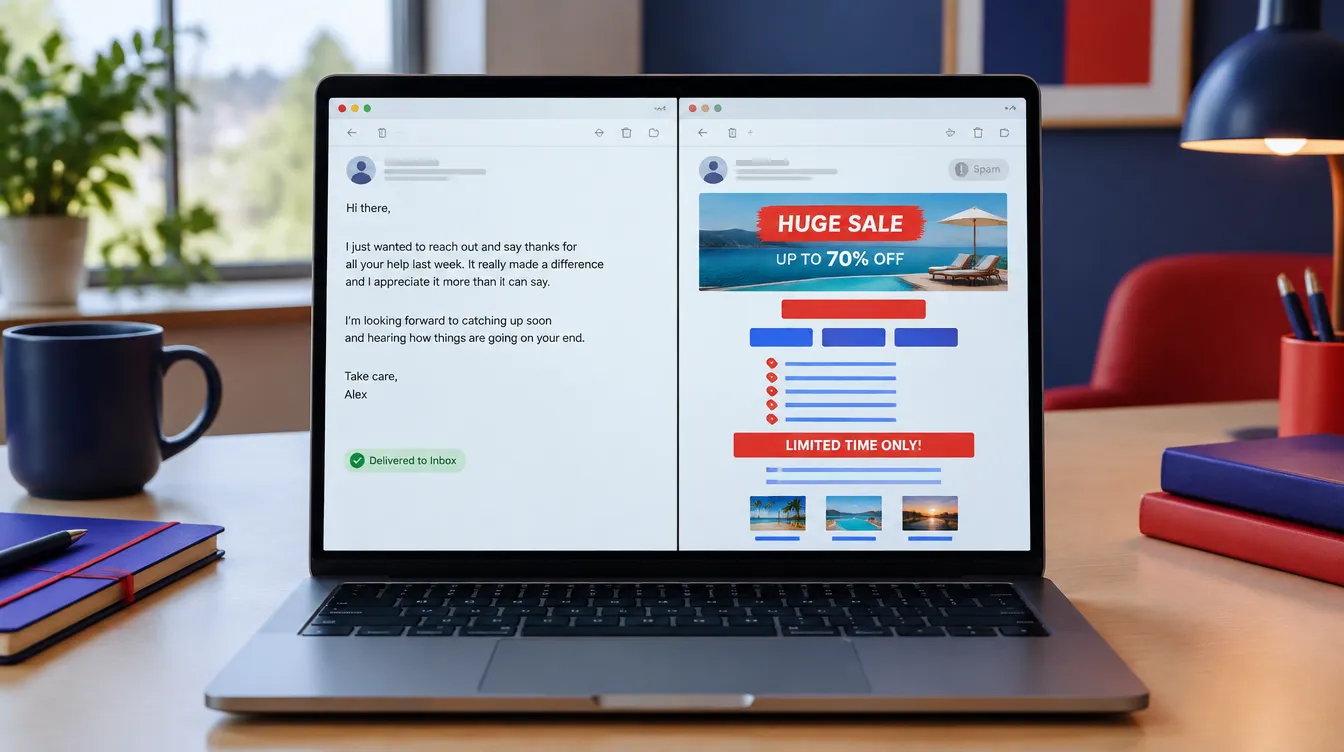
Your emails are going to spam because Gmail, Outlook and Apple have decided, based on how your list behaves, that your list doesn’t want them. Not because of one bad word in a subject line, and usually not because of a technical setting you forgot. The fix is almost always about who you send to and what you send them, and that’s the part most deliverability tools can’t see.
I’ve been building email systems since 2008. This week Jeff Sauer at MeasureU published a note from our monthly mentor call, where he asked JJ Reynolds and me why one of his lists was slipping. Most of what follows is what I told him, with the reasoning behind it.
Where can I check if my emails are landing in spam?
Run an inbox placement test (Mail-Tester, GlockApps and Warmy all offer one) and open Google Postmaster Tools, which shows your compliance status, spam rate and domain reputation for Gmail. That takes ten minutes and tells you whether you have a problem.
What it won’t tell you is why. A seed test sends one email to a handful of test inboxes and reports where it landed. Your real list isn’t a handful of test inboxes. It’s thousands of people with their own history with you, and inbox providers are judging you on that history. So treat the test as a thermometer. If it says you’re fine and your open rates are still sliding, keep reading, because the cause is in your sending behaviour.
What is the difference between email delivery and email deliverability?
Delivery means the receiving server accepted the message. Deliverability means it reached the inbox instead of the spam folder or the promotions tab. Your sending platform reports delivery, often in the high nineties, and that number is close to meaningless. An email that was “delivered” to spam counts as delivered.
This is why people get blindsided. The dashboard says everything is green while half the list never sees the message. If you only look at one number, make it the spam-complaint rate in Postmaster Tools, not the delivery rate in your email tool.
Why does email engagement matter more than anything else?
If your engagement is high, you basically get to write your own rules. Inbox providers score a sender on what recipients do: opens, replies, moving a message out of promotions, adding you to contacts. When those signals are strong, you can send more often, include more links, use more images, and the providers give you the benefit of the doubt.
When engagement is middling, every other decision starts to count against you. The same email that would sail through for a high-engagement sender gets filtered for a low-engagement one. So before you touch templates or subject lines, ask the harder question: does this list actually want to hear from us? If the honest answer is “some of them, sometimes,” that’s the problem to solve, and no amount of formatting will fix it.
Can too many links or images send my email to spam?
Yes, once your engagement is already soft. Links and images are not spam signals on their own. A newsletter from a sender people open every week can carry a dozen links and a header image without trouble. But when a provider is already unsure about you, each extra link and each tracked image is another reason to be cautious, because that’s what bulk promotional mail looks like.
The practical rule: the weaker your engagement, the plainer your email should be. One link, maybe two. No tracking pixels you don’t need. If it looks like a note from a person, it gets treated like one.
Does centre-aligned email look like spam?
In our experience, yes. Real people don’t centre their text. A centre-aligned block of copy with a big button underneath is the visual signature of a marketing blast, and the filters have seen millions of them. Left-aligned text, a normal font, and a signature that looks like a human wrote it reads as correspondence.
This sounds cosmetic. It isn’t. Inbox providers are pattern-matching against everything they’ve ever filtered, and layout is one of the patterns. It’s also the cheapest fix on this list: change the template once and every send after that benefits.
Should I keep emailing people who haven’t opened in months?
No. If you’re mailing people who haven’t opened anything in a couple of months, you’re telling the inbox providers that you don’t clean your list. That’s one of the strongest negative signals there is, because a sender who keeps mailing unresponsive addresses is behaving exactly like a spammer.
Here’s how we handle it. Two rules, depending on where someone is in their relationship with you.
New subscribers get 30 days. What we see across the lists we manage is that someone who doesn’t open anything in their first 30 days is unlikely to ever open anything. The interest that made them sign up has already faded, and every send after that is a quiet vote against you with the inbox providers. So we treat 30 days with no opens as the cutoff for new contacts.
Established subscribers get 90 days. Once someone has engaged, we give them longer, but if they go 90 days without an open or a click, they come off the main list and go into a short re-engagement sequence. A few emails, plain, asking whether they still want to hear from us and giving them something worth opening. If they engage, they come back. If they don’t, they’re removed from active sends. Not deleted, because the record still has value, but no longer mailed.
Cutting your list feels like losing reach. It isn’t. The people you’re cutting weren’t seeing your emails anyway, and keeping them on the list was dragging down delivery for the people who were. A smaller list that opens is worth more than a bigger one that doesn’t, and the smaller list will grow faster because its mail lands.
Is it better to link out or put the content in the email?
Put the insight in the email. This one came mostly from Jeff and JJ, and I agree with them. The habit of writing two lines and linking to “the full post” trains your readers to skip the email, because the email itself never contains anything.
There’s a mechanical reason this matters for deliverability, not just readership. The mailbox providers judge you on what people do inside the inbox: whether they read the message, reply, forward it, move it to a folder, or mark it as spam. Clicks are murkier. Tom Sather, a deliverability researcher at Validity, has said providers don’t use click activity in those calculations, and no mailbox provider has said publicly that they do. So don’t count on a click to your blog to help your inbox placement. Someone reading the whole email is the signal you know counts.
It does depend on your goal. If you need people on your site, because that’s where you measure them or where the sale happens, a link has a job to do. But if inbox placement is the problem you’re trying to solve, the email has to stand on its own. Write it as though there is no landing page. If the reader gets the whole idea without clicking, they’ll read the next one too, and that reading behaviour is what protects you.
AI summaries make this more important, not less. Gmail now generates Gemini summaries of emails, and Apple Mail and Yahoo do the same. A June 2026 study by Aira and BuzzStream looked at how these tools summarised 628 emails and found that Google and Apple drew 82 to 87 percent of each summary from the first half of the message, and almost never mentioned the links. So a two-line teaser with a “read more” button gives the AI nothing to summarise and no link to pass along. Put your main point, and your main link if you have one, near the top, in plain text.
One practical limit: Gmail clips any email over about 102KB and hides the rest behind a “View entire message” link. Most of that weight is template code, not your words, so a plain left-aligned email can carry a lot of writing before it hits the limit. A heavy designed template can’t.
Why are my open and click rates lying to me?
Because a large share of them aren’t people. In his write-up, Jeff shared that when he analysed the clicks on one of his emails, about 80 percent were bots: Apple Mail, Microsoft and other inbox providers prefetching links before a human ever saw the message. Apple’s Mail Privacy Protection has been loading tracking pixels on the user’s behalf since 2021, so “opens” from Apple Mail users are mostly automatic.
This is the measurement problem hiding inside the deliverability problem. If opens and clicks are noisy, you can’t tell whether a change helped. Our answer is to anchor on signals a machine can’t fake: replies, and conversions you can tie back to a specific person. We pass the contact’s ID from the email through to the site and into analytics, so when someone books or buys, we know which send they came from. Opens become a rough trend line. Replies and attributed conversions become the scoreboard.
Can anyone guarantee my emails reach the inbox?
No, and be wary of anyone who says otherwise. Inbox placement is decided by Gmail, Microsoft, Apple and Yahoo, and they don’t publish their rules. What a good deliverability setup does is give every email its best chance: authentication in place (SPF, DKIM and a DMARC record are now mandatory for anyone sending at volume to Gmail), a clean list, a sending pattern that looks human, and content people respond to.
Google’s sender guidelines say to keep the user-reported spam rate under 0.1 percent and never let it reach 0.3 percent. Above that line, Gmail stops offering mitigation. That number lives in Postmaster Tools and it’s the one to watch monthly.
When should you get help, and when you don’t need it
You probably don’t need us if your list is under a few thousand, your open rates are steady, and Postmaster Tools shows a good reputation. Fix your template, clean your list, write better emails, and check back in a quarter.
You probably do need help if your reputation has dropped to medium or low, your sends have started landing in spam at a major provider, you’re migrating platforms or domains, or you’ve never set up authentication and you’re sending at volume. Those situations have a sequence to them, and doing the steps out of order can make it worse.
When we take on a deliverability problem, it starts with a free intro call to look at your setup and what you’re seeing. From there it’s usually a 30-day project: we review authentication, domain reputation, list quality and your platform settings, fix what’s broken (in your DNS directly, or with exact instructions if you’d rather make the changes yourself), then watch Postmaster Tools for 30 days to confirm reputation is recovering. Some clients keep us on after that for ongoing list hygiene and sending strategy. The details are on our email deliverability page.
The bottom line
Emails go to spam when the inbox providers conclude your list doesn’t want them. Tests tell you where you stand. Engagement decides where you land. Clean the list, write left-aligned emails that a person would write, put the value in the message itself, and measure on replies and attributed conversions rather than opens.
If you’d like a second set of eyes on your sending setup, book a 30-minute call and we’ll look at it together.
Sources: Jeff Sauer, “What Two 20-Year Pros Said About Email,” MeasureU newsletter, October 26, 2026. Google Workspace Admin Help, “Email sender guidelines” (bulk sender requirements, 5,000+ messages per day). Google, “Postmaster Tools dashboards.” Litmus, “Apple’s Mail Privacy Protection Is Here,” September 2021. Tom Sather, “Everything Marketers Need To Know About Engagement-Based Spam Filtering,” MarTech (updated May 2021). Aira and BuzzStream, “AI Email Summaries: Our Analysis of Over 600 Emails,” June 2026.
